Business

Contacts Page – Manage Your WhatsApp Customers Smarter

I
Inaiwazhi Team
2026-04-28
7 min read
Contacts Page – Manage Your WhatsApp Customers Smarter
Share this article

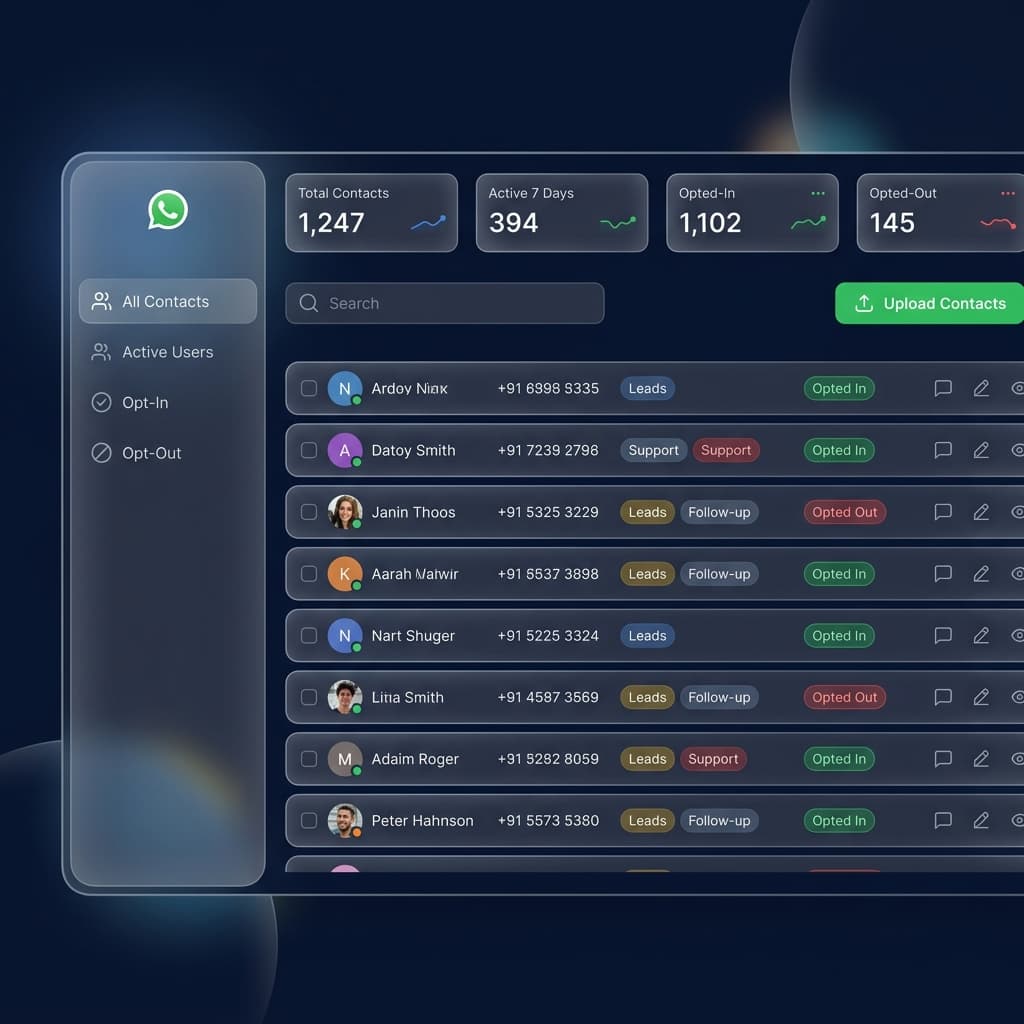
The Contacts Page in Inaiwazhi is where businesses manage all customer data used for WhatsApp communication, campaigns, automations, and support.

Key Takeaways from this Article:

  • Explore in-depth strategies for business automation
  • Learn how to implement scalable workflows for your business
  • Understand the best practices for customer communication and engagement
  • Actionable insights to boost your ROI and productivity

The Contacts Page in Inaiwazhi is where businesses manage all customer data used for WhatsApp communication, campaigns, automations, and support. It helps you store contacts, organize them into segments, upload bulk users, track active customers, and run better targeted campaigns.

How to Add Contacts on Your Dashboard

Method 1: Add Single Contact Manually

Best for adding one new lead or customer. Just open the Contacts page, click the green Add Contact button, fill in the details (Name, Mobile Number, Email, Tags), and click Save.

Method 2: Bulk Upload Contacts

Best for adding many contacts at once. Click the blue Bulk Upload button, upload your CSV or Excel file, match the columns, and click Import. All contacts will be added automatically.

Method 3 & 4: Auto Add Through Integrations & Replies

Contacts can be added automatically when customers submit forms on your website, or when they reply to your campaigns or chatbot flows.

Search & Filter for Better Management

Quickly find contacts by Name, Number, or Email. Use filters to sort by Active users, Opt-In contacts, New leads, Segments, and Recent additions.

Inaiwazhi Insider Tip

Start with your top 100 real customers first. Create segments and send highly relevant campaigns before scaling to larger databases.

Why the Contacts Page Is Important

Organized Customer Data

Without proper contact management, businesses face missed leads and poor customer retention. Inaiwazhi solves this with one smart dashboard.

Active Tracking

Track Total Contacts, Opt-In/Opt-Out status, and Active (7 Days) users who recently interacted with your business.

Smart Segmentation

Targeted campaigns perform much better than sending to everyone. Group contacts by location, interest, or buyer status.

Business Growth Engine

Use contacts for WhatsApp campaigns, automation flows, AI chatbots, and support team management.

Example Use Cases

How different industries use contact management.

Restaurant: Upload past customers and send weekend offers.
Real Estate: Store property leads and send project updates.
School / Coaching Center: Manage student inquiries and reminders.
Clinic: Appointment follow-up and reminders.

Common Mistakes to Avoid

Wrong Number Format

Always include the country code (e.g., +91 9876543210).

No Segmentation

Sending the same message to all users lowers ROI.

No Consent

Only message users who have opted in.

Inaiwazhi Insider Tip

Start with simple automation workflows like welcome messages and FAQs before implementing complex chatbot scenarios. This helps you understand customer needs and refine your approach.

Scale Your Business with inaiWAzhi

Ready to Transform Your Customer Communication?

Join thousands of businesses using inaiWAzhi to automate WhatsApp conversations, increase sales, and deliver exceptional customer experiences at scale.

No credit card required • 7-day free trial • Cancel anytime

Support

Frequently Asked Questions

Find quick answers to common questions about WhatsApp Automation

Conversation

0 Comments

Leave a reply

* Use the same email to edit or delete your comments.

No comments yet

Be the first to share your thoughts!

Get Exclusive Marketing Tips

Join 10,000+ marketers receiving expert insights and automation strategies for WhatsApp.

Privacy first. No spam, unsubscribe anytime.