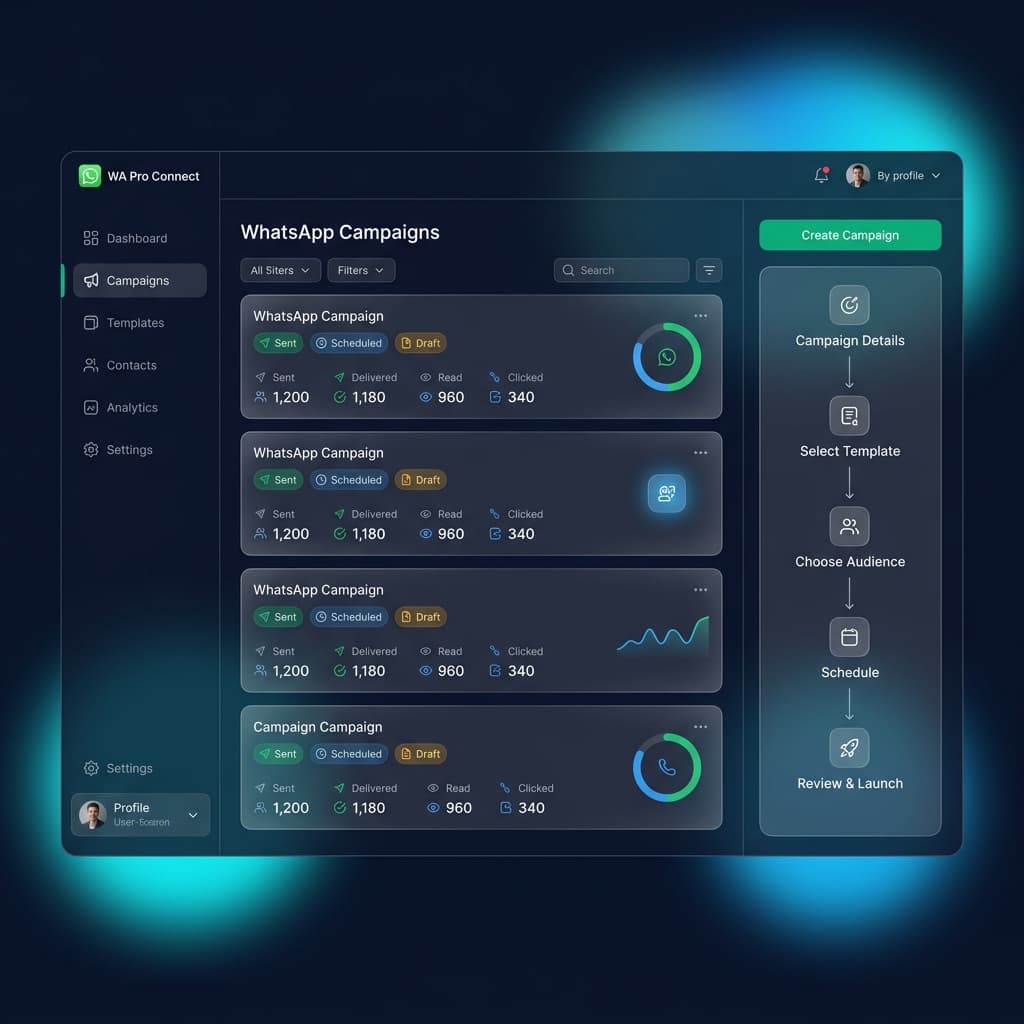
The 5-Step Campaign Builder Flow
Setting up a campaign is simple and professional with our guided flow:
- Campaign Details: Enter a clear internal name (e.g., Summer Sale 2024) and choose the campaign type (Marketing, Utility, Authentication).
- Select Template: Choose a previously approved Meta WhatsApp template.
- Choose Audience: Target specific segments like 'Chennai Leads' or 'Active Users' instead of sending to everyone.
- Schedule: Send immediately or schedule for the best engagement time.
- Review & Launch: Verify template, audience size, and timing before sending.
Important Campaign Limits: Each campaign allows a maximum of 250 contacts, and you can run up to 250 campaigns in total. Plan your segments carefully to maximize delivery.
Inaiwazhi Insider Tip
Create 3 audience segments first: 1) Warm Leads, 2) Existing Customers, and 3) Inactive Users. Run separate campaigns for each group to increase ROI dramatically.
Conversation
0 Comments
Leave a reply
No comments yet
Be the first to share your thoughts!